
B2B · Developer tools · Task monitoring
Monitoring background tasks in one dashboard
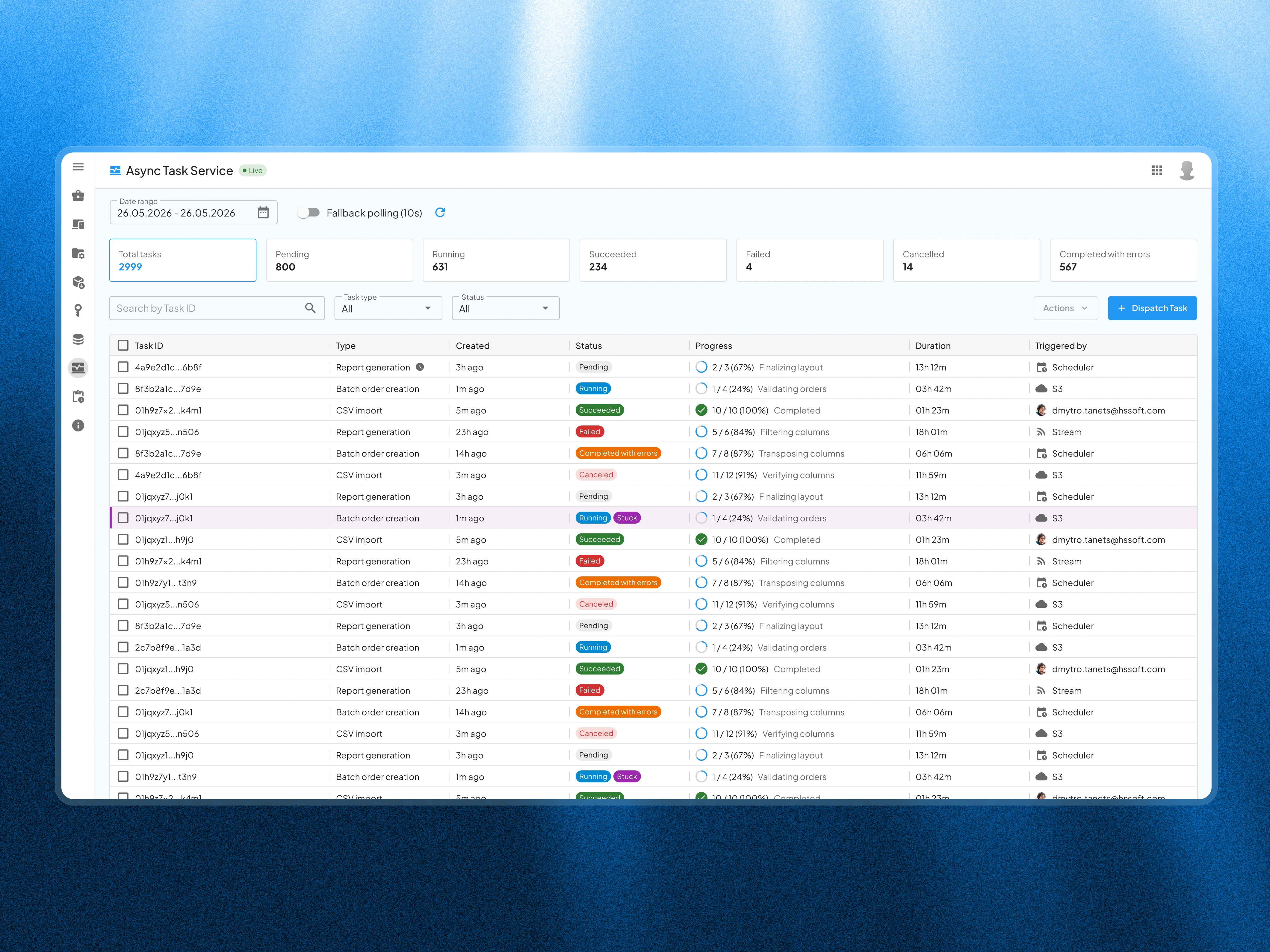
Async Task Service runs background jobs such as CSV imports and report generation. I redesigned its monitoring dashboard for HS-Soft’s operations and engineering teams, adapting the supplied prototype to the company’s UX patterns and refining task filtering, status labels and access to task details.
Starting from a functional prototype
The development team supplied a functional HTML prototype and a detailed brief. The main flows and actions were already defined. My task was to adapt them to HS-Soft’s UX patterns and refine how task information is presented, using the existing design system.
An explicit filter for task status
In the prototype, the status cards also acted as filters. I questioned whether that interaction would be clear and added a standard Status field beside search and task type. The counts remain visible above the table, while the filter has an explicit label.
The design uses “Completed with errors” instead of “Partial”, making the difference from success and failure more specific.
From task status to task details
The table shows task status alongside the current step, progress, duration and launch source. A task can still be Running while also marked Stuck. I kept the two labels together and highlighted the affected row so the extra warning does not replace its execution status.
The existing side-panel pattern keeps the task list visible while showing timings, progress, the JSON payload and event logs. The selected task also has its own action; the running-task example shows Cancel task.